MULTI-CAMERA
AUTO-SYNC TOOL

A FULL DAY OF SHOOTING AT ONCE

*no timecode needed   *no manual routine 

POWERED BY THE MOST ADVANCED SYNCHRONIZATION TECHNOLOGY
DELIVERING THE HIGHEST QUALITY IN THE SHORTEST TIME
including unique placement of clips without audio

20 DAYS  FREE FULLY FUNCTIONAL

20 CLIPS FREE FOREVER (on 2 tracks)

2.7.8 stable

Syncaila 2.7.8
released on June 19, 2025

3.0 BETA

Syncaila 3.0b7
released on January 14, 2026
Is it worth a try? See new features!..

SAVE YOUR TIME AND ENERGY

for creative work

Syncaila is designed to free editors from manual synchronization when working with footage from multiple cameras and audio recorders. It saves significant time and effort, letting you stay fully focused on creative editing.

Quick & Easy

3 SIMPLE STEPS

OPEN
Image icon
Export an XML from your editing program and import it into Syncaila

SYNC

Image icon
Click the Synchronize button in Syncaila
SAVE
Image icon
Export an XML from Syncaila and import it back into your editing program
A beautiful synchrony of the highest quality and maximum speed

THE MOST ADVANCED AUDIO SYNCHRONIZING TECHNOLOGY

Image icon
Human logic simulation
Unique algorithms that simulate human logic in video editing
Image icon
GREAT FOR BIG PROJECTS
Processing multi-hour footage from multiple cameras and audio recorders of various models and formats
Image icon
CHRONOLOGICAL PRECISION
Maximum accuracy in the clip order of a synchronized sequence. Several ordering options to choose from.
Image icon
UNSYNCED CLIP PLACEMENT
Even media files without audio are positioned with less than one second of timing offset.
Image icon
Fast processing
The world’s fastest synchronization!
Image icon
Powerful sync control
Tweak the sync engine for better results on the most challenging projects
Image icon
Accelerated re-sync
Accelerated processing sequences using the same footage. Almost instant re-synchronization!
Image icon
Resource saving
Optimized resource usage. Lightweight install package. Lightweight cache files stored in a single directory.
Designed to sync virtually any multi-camera project.

SYNCAILA 3 – NEW FEATURES

Image icon
Higher sync quality
Noticeable improvements in synchronization quality and accuracy.
Image icon
MUCH BETTER SYNC WITH BAD AUDIO
Radical improvement in sync quality for projects with poor or repetitive audio.
Image icon
SYNC STAGES / VARIATIONS
A selection of several automatically generated sync variations
Image icon
Fine fix tool
Advanced tool to guide Syncaila toward correct synchronization
Image icon
AAF support
Support for Media Composer and EDIUS. Improved integration with DaVinci Resolve.
Image icon
Takes
Automatic synchronization and moving takes onto separate tracks
Image icon
Timecode
Uses timecode when available
Image icon
Auto cuts
Automatic cutting of unnecessary segments
Image icon
Edit preservation
Keeps your cuts and basic track edits intact
Image icon
Separate track settings
Individual settings per track
Image icon
Many new tweaks
A variety of options for different sync scenarios
Image icon
Sleeker interface
A more polished and streamlined interface

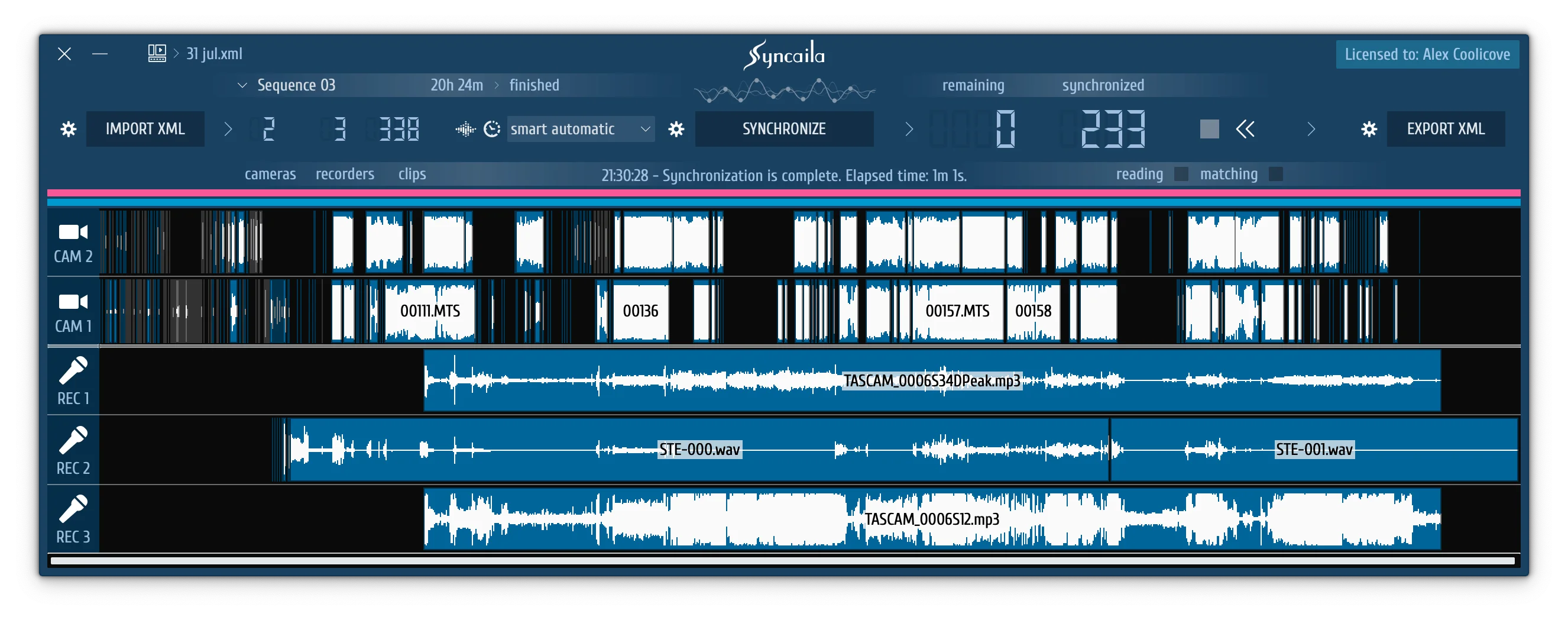
SPECIAL INTERFACE

Syncaila provides a user-friendly, streamlined, and clear interface designed for synchronization.

SYNCAILA SUPPORTS

Final Cut
FCPXML X
Media Composer
AAF
DaVinci Resolve
AAF | FCP XML
Adobe Premiere
FCP 7 XML
Sony Vegas
FCP XML
Edius
AAF
Learn more about compatibility...
Syncaila Lead Developer - Alex Coolicove
A tool for me. A tool for you.

CREATED BY A VIDEOGRAPHER AND VIDEO EDITOR

Hello, colleague! After earning a degree in information technology, I spent 10 years working in video production, so I understand all the nuances of a videographer’s and video editor’s work. Facing the challenges of synchronizing multi-camera shoots, I wanted from the very beginning to get rid of the manual, time-consuming syncing process — but existing automatic tools simply couldn’t handle my projects. Based on my own experience, I created Syncaila and tested it on real full-day multi-camera shoots.

Syncaila is free for 20 days with no restrictions, and always free for up to 20 clips on two tracks. Syncaila will free you from the routine of manual synchronization and save your time, strength, and energy for the enjoyable creative process!

Alex Coolicove, Founder and Lead Syncaila developer

GENEROUS LICENSING

20
DAYS

Syncaila offers a 20-day trial with full features and full synchronization capacity, just like the FULL license.

20
CLIPS
on two tracks

Synchronization of up to 20 clips on 2 tracks is free forever!

Image icon
PERMANENT LICENSE

A permanent license with a one-time payment. No subscription.

Image icon
LIFETIME UPGRADE

Unlimited upgrade to the latest version of Syncaila. All subsequent versions without additional fees.

+

2 in 1

One license key is suitable for both macOS and Windows.

ONE FOR THREE

Even a single-user license allows to use one key on up to three computers, as long as they are not used simultaneously.

LICENSE PURCHASE

Your purchase is a contribution to the development

FULL

all clips

on all tracks

lifetime

SYNC-3

all clips

on 3 tracks

lifetime

SEASON

all clips

on all tracks

6 months

FREE

20 clips

on 2 tracks

+ 20 days of FULL license

WE DO NOT MAKE REFUNDS! Try a free unlimited 20-day trial. Read the FAQ if you need a trial extension.

SEASON license is time limited. When it expires, you can buy a new one.

SYNC-3 license can be upgraded to FULL by paying only the difference in price.

SEASON license requires Internet on every run. Other licenses require Internet on activation and update only.

Enter a registered email that will be used for the LICENSE ACTIVATION and user support. This email will also be used for delivering a license key (if not changed on the next step).
Enter a VALID key (TRIAL, SEASON, SYNC-3) to upgrade or extend the term according to the license type selected above.


Enter a VALID EMAIL that will be used for the LICENSE ACTIVATION and user support. This email will also be used for delivering a license key (if not changed on the next step).
Enter the first and last name of the user or the name of the company. The name may consist only of the Latin characters and/or digits, spaces, symbols: +_-
Enter the number of Syncaila users you will need for multiple-user usage, or leave the default value to buy a single-user license.


Have some questions?

WANT TO KNOW MORE?

READ USER GUIDE

READ POPULAR QUESTIONS

A track means a complete audio track (including all channels) + a video track from the same source. For example, a license for 3 tracks is suitable for 3 cameras projects, 2 cameras + recording from an audio recorder, or 1 camera + 2 simultaneous recordings from an audio recorder.

Starting with Syncaila 3, the trial period is split into two parts, each lasting 10 days. This approach is convenient because you can activate the second part long after the first one has expired. To receive the remaining trial days, install Syncaila 3 and register through the License Info window. The same trial key can also be used with Syncaila 2.

A single license is intended for individual use. It allows the use of Syncaila on 1 (primary) + 2 (additional) computers if non-simultaneous use.

A multi-user license is intended for use by a group of users. It allows the use of Syncaila on N (primary) + N (additional) computers. Running the program on additional computers simultaneously with the primary ones is not permitted.

To avoid license restrictions, it is not recommended to install and run Syncaila on additional computers without the need. Read below about activation limitations.

Almost all cases of this problem are caused by entering a wrong email or license key.

  1. Please make sure you are entering the registered user email (not the customer email, as they may be different).
  2. Copy and paste the email and key into the fields instead of entering them manually.

Contact us if this does hot help.

If you have reached the limit of activated computers or wish to move the license to another computer, you have to deactivate a Syncaila copy you no longer need. Open Syncaila License Info window on a corresponding computer and press Deactivate button. If the button is not active, check that the license key is not hidden. If the license key is hidden, you have to enter it again to deactivate.

It is strongly recommended to deactivate a Syncaila copy before uninstalling / reinstalling the operating system or hardware changes. If you don’t, the activation record will remain. Abandoned activation is automatically reset after 2 months to free an activation slot for a new device.

There is no way to deactivate all devices at once. Additional activation slots are given for all sorts of use cases (including your forgetfulness to timely deactivate). If you forget to deactivate, wait for the slot to be released after 2 months.

We no longer reset activations on our side.

Syncaila 3 has better resistance to OS reinstallation.

This is not possible. It is your responsibility to keep your key safely. Do not share the license key with others because this is a violation of the License Agreement and you put yourself at risk of activation problems.

Yes, there is a discount when buying a license for several users ( 2-4 users: 15%; 5-9: 20%; 10 and above: 25%). The discount will be automatically calculated upon purchase.

Please note that a multi-user license is intended for a company. A license key is given one common for a company. If you are going to unite for an economical purchase of licenses, then you will lose some advantages of a single-user license, which are:

  1. Additional computers. A single-user license allows the non-simultaneous use of Syncaila on 2 additional computers. A multi-user license adds N additional computers where N = the number of users.
  2. No risk. If any user of a multi-user license violates the license agreement terms, a key will be blacklisted, and other users may suffer.

If you like our software, help others to hear about it.

  1. Spread the word about Syncaila (in public, not in a private message).
  2. Send a link or a screenshot of your recommendation of Syncaila to mail@syncaila.com
  3. Get a 20% discount code!

There is not much information about Syncaila on the web. Making a video review for youtube or writing an article for a known website, you can get a license for free. Contact us with your proposal at mail@syncaila.com

WRITE US HERE

We always respond to all Syncaila users. Response time: from a few hours to a few days.
If you did not receive a reply from us within 3 days, please check your spam folder and report the message as not spam.

A more reliable way is to email us directly to support@syncaila.com

© Alex CooliCove. All rights reserved.